Showing posts with label cn. Show all posts

Wednesday, March 2, 2022

Implementation of GSM security algorithms (a3/a5/a8) code python source code

 Hello !!

For many other Language Programs of Computer Network, Mobile Computing, microprocessor 8086, C++ , Data Structures , etc and MSBTE diploma,BCA,MCA and engineering related concepts visit our  BLOG

We will see the Implementation of GSM security algorithms program code(A3/A5/A8) using Python  Programming Language in today's post.

Theory:-

  • The term GSM stands for Global System for Mobile Communications.
  • Mobile communications have to communicate using the global positioning for providing the user with better and efficient communication service by protecting against unauthorized access a privacy of mobile subscribers against  any kind of eavesdropping.
  • The system of GSM provides a way of ciphering the text which is an crucial way to protect user from evesdropping . and for the whole ciphering process we require the TSMI i.e.,Temporary Subscriber Identity. there's is a 4 to 8 digit PIN asssociated to validate the identity of the subscribers. The PIN here stands for Password Identification Number.
  • The way this whole process is carried out is shown as follows accoring to the steps:
    • At the time of service provisioning the IMSI, 
    • individual subscriber authentication key (Ki), 
    • authentication algorithm (A3) performed
    • cipher key generation algorithm (A8) performed
    • encryption algorithm (A5) performed

As we understood the background of the GSM and their use. In the above theory all the steps of GSM process are shown, we will be moving further at the coding part.

Explanation of the source codes:-
             
Algorithm of A3 i.e the first procedure of  authentication is carried out by this algorithm. It is used to authticate the identity of bothe the subscribers connected in the network.The keys are 128-bit and we use the RES algorithm of cryptography here to send the authentication information to each other.

Algorithm of A8 i.e. the process for generation of cipher text also called as the process of encrypting the text into secret form which prevents the attacker to spoof the data.
 

Source code in Python for A3 Algorithm of GSM:-

import random  

k=random.getrandbits(128)  

m=random.getrandbits(128)  

kb=bin(k)[6:] 

mb=bin(m)[4:]  

kbl=kb[0:64]  

kbr=kb[64:]  

mbl=mb[0:64]  

mbr=mb[64:] 

a1=int(kbl,2) 

int(mbr,2)  

a2=int(kbr,2) 

int(mbl,2)  

a3=a1^a2  

a4=bin(a3)[2:].zfill(64)  

a5=a4[0:32] 

a6=a4[32:] 

a7=int(a5,2) 

int(a6,2)  

print("128 Bit Key = ",kb) 

print("128 Random Bits Generated = ",mb)

print("RES/SRES =",bin(a7)[2:].zfill(len(a5)))


Source code in Python for A8 Algorithm of GSM:-


import re import  

copy import sys

reg_x_length = 19 

reg_y_length = 22 

reg_z_length = 23 

key_one = ""  

reg_x = []  

reg_y = [] 

reg_z = [] 

def loading_registers(key): i = 0 

while(i < reg_x_length): 

reg_x.insert(i, int(key[i])) 

i = i + 1 

j = 0 

p = reg_x_length while(j < 

reg_y_length): 

reg_y.insert(j,int(key[p])) p = p + 1 

j = j + 1 

k = reg_y_length + reg_x_length r = 0 

while(r < reg_z_length): 

reg_z.insert(r,int(key[k])) k =  

k + 1 

r = r + 1 

def set_key(key): 

if(len(key) == 64 and re.match("^([01])+", key)): key_one=key 

loading_registers(key) return True 

return False 

def get_key(): 

return key_one 

def to_binary(plain): s = "" 

i = 0 

for i in plain: 

binary = str(' '.join(format(ord(x), 'b') for x in i)) j = len(binary) 

while(j < 8): 

binary = "0" + binary s = 

s + binary 

j = j + 1  

binary_values = [] 

k = 0 

while(k < len(s)): 

binary_values.insert(k, int(s[k])) 

k = k + 1 return  

binary_values


def get_majority(x,y,z):


if(x + y + z > 1): 

return 1 

else: 

return 0 

def get_keystream(length): 

reg_x_temp = copy.deepcopy(reg_x)  

reg_y_temp = copy.deepcopy(reg_y)  

reg_z_temp = copy.deepcopy(reg_z)  

keystream = [] 

i = 0 

while i < length: 

majority = get_majority(reg_x_temp[8], reg_y_temp[10], 

reg_z_temp[10]) 

if reg_x_temp[8] == majority: 

new = reg_x_temp[13] ^ reg_x_temp[16] ^ reg_x_temp[17] 

^ reg_x_temp[18] 

reg_x_temp_two = copy.deepcopy(reg_x_temp) j = 1 

while(j < len(reg_x_temp)): 

reg_x_temp[j] = reg_x_temp_two[j-1] j = j +  

reg_x_temp[0] = new 

if reg_y_temp[10] == majority: 

new_one = reg_y_temp[20] ^ reg_y_temp[21]  

reg_y_temp_two = copy.deepcopy(reg_y_temp) k = 1 

while(k < len(reg_y_temp)): 

reg_y_temp[k] = reg_y_temp_two[k-1] k = k  

+ 1 

reg_y_temp[0] = new_one 

if reg_z_temp[10] == majority: 

new_two = reg_z_temp[7] ^ reg_z_temp[20] ^ reg_z_temp[21] ^ 

reg_z_temp[22] 

reg_z_temp_two = copy.deepcopy(reg_z_temp) m =  

while(m < len(reg_z_temp)): 

reg_z_temp[m] = reg_z_temp_two[m-1] m =  

m + 1 

reg_z_temp[0] = new_two 

keystream.insert(i, reg_x_temp[18] ^ reg_y_temp[21] ^ 

reg_z_temp[22]) 

i = i + 1 

return keystream


def convert_binary_to_str(binary): s = "" 

length = len(binary) - 8 i = 0 

while(i <= length): 

s = s + chr(int(binary[i:i+8], 2)) i = i + 8 

return str(s) 

def encrypt(plain): 

s = "" 

binary = to_binary(plain) 

keystream = get_keystream(len(binary)) i = 0 

while(i < len(binary)): 

s = s + str(binary[i] ^ keystream[i]) i = i + 1 

return s 

def decrypt(cipher): 

s = "" 

binary = [] 

keystream = get_keystream(len(cipher)) i = 0 

while(i < len(cipher)): 

binary.insert(i,int(cipher[i])) 

s = s + str(binary[i] ^ keystream[i]) i = i + 1 

return convert_binary_to_str(str(s)) 

def user_input_key(): 

tha_key = str(input('Enter a 64-bit key: ')) 

if (len(tha_key) == 64 and re.match("^([01])+", tha_key)): return 

tha_key 

else:  

while(len(tha_key) != 64 and not re.match("^([01])+", if 

tha_key)):  

(len(tha_key) == 64 and re.match("^([01])+", 

tha_key)): 

return tha_key 

tha_key = str(input('Enter a 64-bit key: ')) 

return tha_key 

def user_input_choice(): 

someIn = str(input('[0]: Quit\n[1]: Encrypt\n[2]: Decrypt\nPress 0, 1, or 2: ')) if (someIn == '0' or someIn == '1' or someIn == '2'): return someIn


else: 

while(someIn != '0' or someIn != '1' or someIn != '2'): 

if (someIn == '0' or someIn == '1' or someIn == 

'2'): return someIn 

someIn = str(input('[0]: Quit\n[1]: Encrypt\n[2]: 

Decrypt\nPress 0, 1, or 2: ')) return 

someIn 

def user_input_plaintext(): try: 

someIn = str(input('Enter the plaintext: ')) 

except: 

someIn = str(input('Try again: ')) 

return someIn 

def user_input_ciphertext(): 

ciphertext = str(input('Enter a ciphertext: ')) if 

(re.match("^([01])+", ciphertext)): 

return ciphertext 

else: 

while(not re.match("^([01])+", ciphertext)): 

if (re.match("^([01])+", ciphertext)):  

return ciphertext 

ciphertext = str(input('Enter a ciphertext: '))

return ciphertext 

def main_fun(): 

key = str(user_input_key())  

set_key(key) 

first_choice = user_input_choice() if(first_choice == 

'0'): 

print('Have an awesome day!!!') sys.exit(0) 

elif(first_choice == '1'): 

plaintext = str(user_input_plaintext())  

print(plaintext) print(encrypt(plaintext)) 

elif(first_choice == '2'): 

ciphertext = str(user_input_ciphertext()) print(decrypt(ciphertext)) 

main_fun()


Friday, February 18, 2022

Installing Docker in Windows 10 and running the commands for Hello world image

Aim:- Create Docker Id, Install docker on machine, Pull hello-word image file from Docker Hub

and Run the file

Requirements:- Docker

Theory:-

• It is (PaaS) products used for delivering software in packages which are known as the containers. 

Steps:-

Docker Hub :- Account creation 

Below on main screen click ‘Download for Windows’ 

The download process will start


click on setup and follow steps shown below 

Click ok

Check your Desktop for Docker application.


Open cmd and runthe commands:-


Need to download WSL2:- 

wsl --list –online 

wsl –update 

wsl --set-default-version 2 

Check docker version and pull,run image:- 

docker -v and use the docker command to pull and run ‘hello-world’


8086 Bock transfer OVERLAPPING 
Android Checkbox code and example
Android Calculator Program Code
Android Bluetooth On and Off code

CISCO PACKET TRACER network topologies
FTP protocol CISCO Packet tracer implementation
Docker Installation full process
Android Calculator source code
For more other networking, Android, Data structures, Microprocessor 808, etc subject programs visit out website. All resources are available for free so do share website with your friends and students.


Check out other subjects: (Desktop) Check out subject tab & (Mobile) Top Right Corner drop- down menu.

Subject wise experiment list with Source code links :-


Friday, February 11, 2022

Computer Network Different Types of Topologies and its Implementation using Vlabs and Cisco Packet Tracer Simulator


  • Every particular network is built onto one of the network topologies . Network topologies are quite important to give a definite structure to the network we want to build. The network topologies need different network components like the switch, cable, hub, etc . 
  • The different topologies have their own pros and cons. But its our choice to decide which network topology we want to work with according to our need from the network.
  • There are various parameters on which we judge the type of topology we choose, parameters can be cost, how large your organisation is, speed, tracking pf packets and monitoring them, and many more.
  • If we need to customise the netwok topology by merging 2 or more than 2 topologies then we can opt for the 'Hybrid Topology'. One of the example of hybris can be - bus topology with star topology.
  •  The step by step process of simulation in different network topologies is shown below. The experiment displays the implementation of topologies using Cisco packet tracer simulator. 


Theory:- 

Devices on network are nodes. The most common nodes are computers & peripherals. 

There are different types of network topologies as follows: 


Bus Topology :-

                                             The bus, topology uses one main cable to which nodes are directly connected. The main cable acts as a backbone for network  One of the computers in network acts server.

                                           • Advantages include ease of installation. Backbone can be laid along most efficient path connected to  lines of various lengths


 Star Topology :-

                                           In this each computer is connected to central hub using poin-to - point connection. Central hub can be computer server manages network or can be simpler device that makes connections between computers over network possible. 

                                           • Advantages are :- It is very popular because startup costs are low. Easy to add new nodes . 

                                           Disadvantage :- N/W Network is robust in sense that if central hub fails entire network goes down. 


Mesh Topology :-

                                            Every device is connected to another device via dedicated channels known as links - Suppose N devices are connected total no q ports required by each device is N-1.

                                             • Advantage :-Mesh topology is robust & provides security & privacy. Fault is diagnosed easily Data Transfer is reliable

                                            • Disadvantage :-but installation & configuration is difficult Cost of maintainance is high 


Output:-

The below is practical demonstration of using cisco packet tracer to implement star topology. 

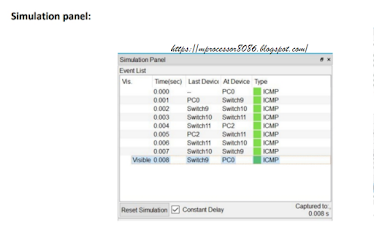
The simulation panel for star topology looks like this.

The below is practical demonstration of using cisco packet tracer to implement ring  topology.
The simulation panel for ring topology looks like this.
The below is practical demonstration of using cisco packet tracer to implement bus  topology.

The simulation panel for bus topology looks like this.


For more other networking, Android, Data structures, Microprocessor 808, etc subject programs visit out website. All resources are available for free so do share website with your friends and students.

Check out other subjects: (Desktop) Check out subject tab & (Mobile) Top Right Corner drop- down menu.

Subject wise experiment list with Source code links :-